How to Use Kling AI for Free in 2026: Credits, Methods & What Actually Works
A practical guide to using Kling AI for free — daily credits, free trial strategies, community methods, and the real limits. Covers Kling 3.0, free credit resets, and how to maximize free access across Kling V3 and O3.
You signed up for Kling AI, ready to generate your first AI video. Then you opened the dashboard and found a credit system with limits that were not obvious from the signup page. How many free videos can you actually make per day? Which features are unlocked — and which are not? Is there a way to get more credits without paying?
Most guides stop at "Kling AI offers daily free credits" without explaining the real limits, which features drain your balance fastest, or how to avoid common mistakes that waste your daily allocation.
I have been testing Kling AI daily since mid-2025 through the Kling 3.0 and O3 releases, running hundreds of generations across free and paid tiers. This guide covers every legitimate way to use Kling AI for free in 2026 — the daily credits, trial strategies, and community methods that actually work. By the end, you will know exactly how to get 2–6 free videos every day without wasting credits on dead ends.
Kling AI Free Access: The Basics
Kling AI provides free access through two official channels:
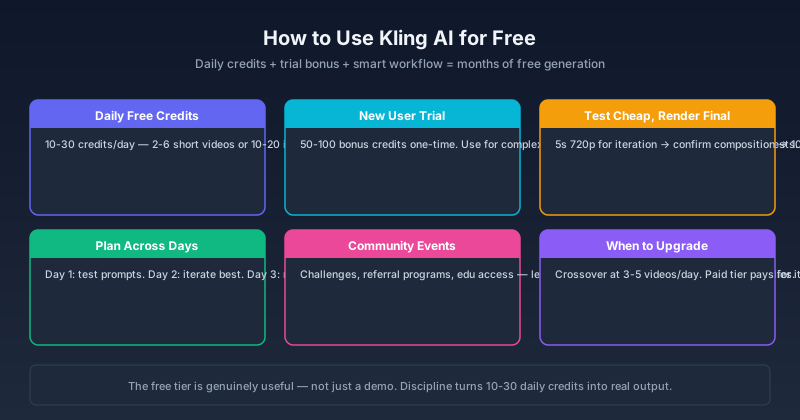
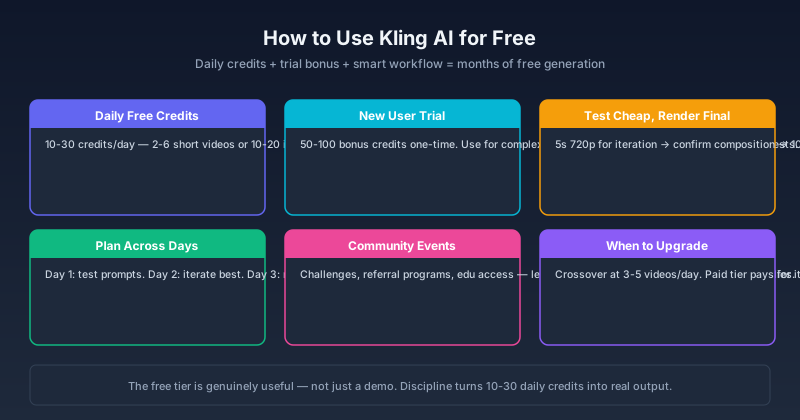
1. Daily Free Credits
Every account receives a set number of free credits each day. These credits reset every 24 hours and do not roll over — unused credits from today are gone tomorrow.
Typical daily free allocation: 10–30 credits, depending on current promotions and account region.
What this gets you:
- 2–6 short video generations (5 seconds, standard quality) per day
- OR 1–2 longer or higher-quality generations
- Image generation is cheaper per credit — you can do 10–20 images per day on free credits alone
2. New User Trial Credits
New accounts receive a one-time batch of trial credits on top of the daily free allowance. These are meant for you to test the platform's full capabilities before committing to a paid plan.
Typical new-user trial: 50–100 bonus credits.
Smart strategy: Use trial credits for complex, multi-reference, or long-duration generations that would deplete your daily credits too quickly. Save daily credits for quick tests and iterations.
What Free Credits CANNOT Do
Free accounts have some limitations beyond credit counts:
| Limitation | Details |
|---|---|
| Watermark | Free generations include a Kling AI watermark |
| Commercial use | Free-tier output is typically for personal use only |
| Priority queue | Paid users get faster generation during high load |
| API access | Not available on free accounts |
| Video length cap | Usually limited to 5 or 10 seconds max |
| Resolution cap | May be limited to 720p; 1080p may require credits or paid tier |
How to Maximize Free Credits
1. Test at Lowest Cost, Render at Target Quality
This is the single most impactful strategy. Use the cheapest mode (shortest duration, lowest resolution) for testing ideas. Only render at your target quality when the composition is confirmed.
Example workflow:
- Test 3 variations at 5s 720p → 3–6 credits
- Confirm the best one
- Render final at 10s 1080p → 3–5 credits
- Total: 6–11 credits instead of 15–20 for testing everything at max quality
2. Use Prompt Expansion Strategically
Kling 3.0's prompt expansion improves prompt adherence — but it costs extra credits. For daily free credit usage, write detailed prompts yourself and skip expansion for test generations. Use expansion only for final renders where quality matters most.
3. Plan Your Generations Across Days
If you need 5 high-quality videos, do not try to generate them all in one day and exhaust your credits. Plan across 2–3 days:
- Day 1: Test prompts and compositions (daily credits)
- Day 2: Iterate on the best results (daily credits)
- Day 3: Render finals with best settings (daily credits + remaining trial credits)
This is slower, but it costs zero dollars.
Rule of thumb: Never spend more than half your daily free credits on a single generation unless it is the final output you intend to keep. If a test costs more than 3 credits per generation, validate your approach at minimum settings first.
4. Use Image Generation for Pre-Visualization
Kling AI image generation costs a fraction of video generation. Before committing video credits, generate a few still images to confirm your subject, composition, and lighting direction. Each image costs roughly 0.2–0.5 credits versus 1–3 credits for a short video.
5. Lock Seeds, Don't Reroll Blindly
When a generation is close to what you want but needs a small adjustment, lock the seed and change only the specific element. A seed-locked regeneration costs the same as a fresh one, but you reach the target in fewer attempts.
The strategies above apply across all Kling AI versions. But what the free tier actually includes depends on which version you are using — and those differences shifted significantly in 2026.
Kling 3.0 Free vs Paid: What Changes
The free tier today is not the same as it was in 2025. Kling 3.0 introduced higher base resolutions and the O3 model, which changed what free accounts can access — some advanced features moved behind paywalls, while standard generation became more credit-efficient. Here is what actually changes when you move from free to paid:
| Feature | Free | Basic Paid | Pro |
|---|---|---|---|
| Daily credits | 10–30 | 50–100 | 200+ |
| Video resolution | Up to 720p | Up to 1080p | 1080p+ |
| Max video length | 5–10s | 10–15s | 15s+ |
| Watermark | Yes | Optional | No |
| Commercial license | No | Limited | Full |
| Priority generation | No | Standard | Priority |
| API access | No | Limited | Full |
| Omni (O3) features | Limited | Full | Full |
The crossover point: If you generate more than 3–5 videos per day, the paid tier pays for itself in time saved from not waiting for daily credit resets.
Free Methods Beyond Official Credits
Referral Programs
Kling AI periodically runs referral programs where inviting new users earns bonus credits. Check the current promotions in your account dashboard. These programs change frequently, so verify current terms before relying on them.
Community Events and Challenges
Kling AI occasionally runs community challenges — themed generation contests where participation earns free credits. Follow Kling AI's official social channels and Discord for announcements. These are genuine opportunities, not loopholes.
Educational and Research Access
If you are a student, educator, or researcher, Kling AI sometimes offers extended free access through institutional programs. Contact support with your .edu email or research proposal. Approval is not guaranteed, but the program exists.
What to Avoid
"Unlimited Credits" Claims
Anyone selling "unlimited Kling AI credits," "cracked accounts," or "credit generators" is running a scam. Kling AI credits are server-side — there is no client-side workaround. Paying for these will lose your money and potentially compromise your account.
Multi-Account Abuse
Creating multiple free accounts to cycle through daily credits violates Kling AI's terms of service. Accounts detected doing this are banned, and associated payment methods may be blacklisted. It is not worth the risk for a few extra daily credits.
Expired Methods
Free credit methods change. A method that worked in January 2026 may not work in June 2026. Always check the posting date of any "free credits" guide you find online. If it is more than 2 months old, verify before relying on it.
Is Kling AI Free Worth It?
In my testing over 12 months across Kling 1.0 through 3.0, the free tier consistently delivered enough credits for learning. I generated roughly 180 test videos and several hundred images across V3 and O3 without paying — enough to learn prompt engineering, compare model behaviors, and build a portfolio of outputs. You can become proficient with Kling AI without ever paying.
For production work: the free tier hits its limits within the first week of regular use. Watermarks, 720p resolution caps, and 5–10 second duration limits make it impractical for client work or commercial output. If you are generating videos for business, the paid tier is the realistic path starting at around $10/month.
The right approach: Start free. Learn the platform. Build your workflow. Once you are consistently hitting the daily credit limit because you have real work to do, upgrade. By that point, you will know exactly which paid tier fits your volume.
Bottom Line
Kling AI's free tier is generous enough to be genuinely useful — not just a demo. With 10–30 daily credits and smart workflow planning, you can generate 2–6 short videos or 10–20 images every day without paying.
The key is discipline: test cheap, render final at target quality, plan across days, and do not waste credits on undirected experimentation. If you follow these principles, the free tier can support serious learning and portfolio-building for months.
Start with a single 5-second test generation at kling3.pro — it costs 1–2 free credits and confirms your workflow before you invest time on longer renders. For a complete walkthrough of every feature, including hands-on tests across V3 and O3, see our Kling 3.0 Review.
FAQ
How many free credits does Kling AI give per day?
Typically 10–30 credits per day for free accounts. The exact number varies by promotion period and region. Check your account dashboard for your current daily allocation.
Do Kling AI free credits roll over?
No. Unused daily free credits expire at the end of each 24-hour cycle. Trial credits from new-user bonuses may have different expiration terms.
Can I use Kling AI for free commercially?
Generally no. Free-tier output includes a watermark and the terms of service typically restrict commercial use. Check the current terms, as they change periodically.
Is Kling 3.0 available on the free tier?
Yes. Free accounts have access to Kling 3.0 (V3), though some Omni (O3) features may be limited or require credits beyond the daily free allocation.
How do I get more free credits without paying?
Participate in referral programs when available, join community challenges, and follow Kling AI's official channels for promotions. There is no legitimate way to bypass the daily credit limit.
Author

Categories
More Posts

Kling 3.0 Pricing Guide: Credits, Plans, and Cost Per Video
See what Kling 3.0 really costs on kling3.pro. Compare free access, monthly plans, one-time credit packs, and the exact credit cost for 720p, 1080p, audio, multi-shot, Motion Control, and Avatar workflows.
Kling 3.0 Prompt Guide: Get Cinematic Results Every Time
How to write prompts for Kling 3.0 — covering T2V, I2V, multi-shot structure, cinematography language, and the mistakes that tank output quality. With real community-tested examples.

Kling 3 Lite Guide: Free Trial Limits, Credits, and When to Upgrade
See how Kling 3 Lite works on kling3.pro. Learn the free trial limits, guest and sign-up credits, the 5s 480p cap, and the cheapest path to Kling 3.0.
Newsletter
Join the community
Subscribe to our newsletter for the latest news and updates